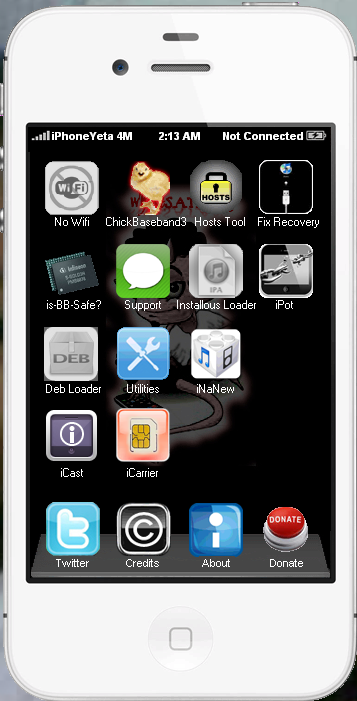
My apology to all new users of iPhoneyeta that start to used
from iPhoneYeta 4M and download the full setup of 4M.
I found out that baseband 6.15 file for ( chicken baseband )
that we use for offline fetching baseband using redns0w is
not included on that setup....
Because of that users that start from iPhoneYeta 4M can't
update 3G and 3GS baseband to 6.15 using chicken baseband..
i'm sorry for that..
Anyway for new users and who downloads the full setup of iPhoneYeta 4M..
This the full setup of iPhoneYeta 4N with iHardware.
This update is dedicated to all mobile phones technician all around the worlds who works in idevice with hardware method.
Big thanks to NuJiN for giving me permission to include all his hardware repair guide to my iPhoneYeta.
This require plugins...(iHardware Plugins)
So if your not work in hardware for apple devices you don't need this feature,
But update your iPhoneYeta to this version to make it work and don't get iHardware plugins.
Thanks to irt PinoyUnlocker for helping me to test this version.
When you look at the smartphone market today compared to just a few
years ago, you'd be surprised at just how different it is. Today's
smartphones are slowly taking on more features of PCs than phones – and
none more so than the recent release of Windows Phone 8.
You could put this down to hardware, with high end phones such as the Samsung Galaxy S3 or HTC One X both powered by quad core processors, but the software is also continually evolving to support it.
Windows Phone 8 - release date and latest details
iOS 6, Android 4.1
and now Windows Phone 8 are moving more quickly than ever, constantly
trying to out-do the others to gain more customers, but also to stay at
the forefront of an ever-changing market.
Interface
Windows
Phone 8 builds upon the easy to recognise system of "Live Tiles". To
those unfamiliar, these are squares placed on the home screen that
represent different apps, such as a music player or for messaging, that
are interactive.
Whilst remaining fundamentally the same, updates
from the Windows Phone 7 interface now bring more customisable tiles,
to allow you to squeeze even more onto your screen. Another major update
sees the company bringing in data management via DataSmart, which
perfect for those on limited contracts.
Android 4.1 takes the
customisable homescreens to the next level. Widgets have been always
been the heart of the Android OS, and Jelly Bean
makes these easier to move, with homescreens adapting to accommodate
the placement and resizing of your widgets. These are also easily
removed with a quick swipe upwards in edit mode.
Apple uses a
tried and trusted formula, based upon simplicity. No widgets, no tiles,
just a grid of app icons that you scroll through from the home page.
Each iteration has added greater functionality, with iOS 6 strengthening
Siri and even locking children out of certain areas.
Maps
Android
4.1 somewhat unsurprisingly, bases its mapping system on the well
known Google Maps, bringing Street View, 3D and indoor mapping.
Integrating with Google Now, the mapping system continues the sat-nav
experience for both pedestrians and motorists, providing details of how
and when to leave to get to your appointments on time.
Windows
Phone 8 surprisingly ditches Microsoft's proprietary Bing Maps. On the
other hand, its new system is hardly shocking. Windows Phone 8 now
brings in the Nokia mapping system, bringing 3D street navigation, and
Nokia's Navteq Traffic Service.
iOS has traditionally also based their mapping on Google's offering. This all changes with iOS 6, with Apple's new proprietary system
providing turn by turn navigation, integration with Yelp for business
listings, and Siri for voice control. Like the others, there are also 3D
maps, a traffic service and a satellite view.
Traffic data is
prevalent through all three, although Apple has taken this one step
further by allowing anonymised croud-sourced data at the sites of
traffic congestion to help you understand what's going on.
Camera
Microsoft
hasn't skimped on Windows Phone 8's Camera app, getting a new simple,
clean look, with a small menu button that accesses the camera's various
settings. Nokia branded handsets are also set to bring over the PureView technology that was made famous in the Nokia 808 PureView.
Android
4.1's camera system brings in more changes. It's faster than ever, and
has a fast review system making editing and removing images simpler.
There
are also varying scene modes, customisable levels white balance and
exposure, all helping you to create your ideal shot. A panoramic mode
and photo editing are also thrown in, alongside the impressive zero
shutter lag.
iOS 6 builds upon the work from iOS 5, debuted on the iPhone 4S.
Continuing the simplicity theme, settings are all sorted automatically,
including whether the flash is used or not. Focus is also automatic,
unless you specify a certain area by touching the screen. For those who
require a physical shutter button, iOS also allows the use of the up
volume button as well as the on screen option.
NFC
Windows Phone 8 packs in Microsoft Wallet, making use of any NFC
technology packed into handsets. This is all set to tie in to varying
applications installed on the phone, allowing payment via services such
as Paypal. Other applications, such as instant pairing of Bluetooth
accessories will also be supported.
What is NFC?
Google
also seems keen to use NFC, using services such as Android Beam and
Google Wallet (currently only available in the US). The premier service
allows for the instantaneous sharing of contacts, media and apps between
two enabled phones, whilst the latter stores your card details to allow
instant payment in stores.
Google's Android beam gets an overhaul
in 4.1. It now provides instant transfer of photos, videos and apps, as
well as the instantaneous pairing of NFC enabled Bluetooth devices.
iOS
6 brings in Passbook. Whilst not entirely a NFC based app, it does
provide a lot of the same features, keeping varying tickets to sports,
the theatre, airlines or store cards all in one easy to access, and
constantly updated place.
We're expecting Apple to announce NFC capabilities in the iPhone 5 – given the fact rivals are all over the contactless technology,
Browser
Internet browsing on Android 4.1 comes with the standard Android Browser; however the premier Jelly Bean device, the Google Nexus 7 comes with Chrome.
The
standard browser packs in some very cool security features, as well as
the ability to save pages for offline reading and tabbed browsing. Also
available is Google Chrome, which ports over many of the desktop
features, as well syncing history and bookmarks as well as a slicker
experience for Android 4.0+ devices.
Windows
Phone 8 takes internet browsing very seriously, bringing the latest
version of Internet Explorer, IE10. This will help keep WP8 at the
forefront of the mobile internet browsing, but also keeps you safe
whilst you do. IE10 comes with a phishing filter and SmartScreen service
to make it harder for you to be tracked by malicious websites.
Safari
on the original iPhone changed the level of acceptability from mobile
browsing, and iOS 6 brings over more features such as offline reading
and integration to iCloud allowing for tab syncing. Plus there are also
Smart App Banners which help sites promote their apps, bringing a richer
cohesion to the whole iOS platform.
Media
One area that
Windows has suffered from before is microSD card support. Thankfully
this is rectified in Windows Phone 8, as now Windows Phone 8 allows for
media to be easily stored and accessed via a microSD card, as well as
supporting the installation of apps onto it. Elsewhere is the support
for 1280 x 768 and 1280 x 720 resolutions on top of the current 800 x
480.
Android
4.1 is now a much smoother experience, providing 60fps across the whole
device. Google Play is also at the heart of the whole OS, bringing
Music, Movies and eBooks right to the forefront.
Google Music
gives a decent option for storing and accessing your music, and the
likes of the Samsung Galaxy S3 build on the OS to support a fantastic
range of video and audio formats too.
Apps to microSD has also
been a standard feature of Android 2.2+, as well as supporting stored
media. Google Play media however, is all stored free in the cloud and
portable to all your devices.
Believe it or not… the company that
brought us the iPod also has media prevalent on its OS. It doesn't
provide microSD support, but Apple has a habit of making devices with
large internal storage to compensate.
Media is handled via both wired and wireless access via iCloud to the iTunes store, which has long provided music and films.
However,
the screen size of the iPhone is still too small for extended movie
watching, although the on-board audio support is among the best around
for a music marathon on the way to work, be it on the iPad, iPod touch
or iPhone.
Tablet support
Microsoft went out of its way to show off the new Microsoft Surface tablet,
but this is running Windows 8. Whilst there is no word from Microsoft
as to whether we will see a Windows Phone 8 Tablet, we would bet that it
ties in strongly to Windows 8, as they are both based upon the same
kernel to allow easy development on both.
As mentioned, Windows
Phone 8 also now supports the 1280x768 resolution, so seeing a tablet
running the mobile OS is not as farfetched as it might once have been.
Android
4.0 was billed as the operating system that united both smartphone
technology with tablet PCs. It took the best of 2.3 (Gingerbread) and
combined it with 3.2 (Honeycomb) to provide a seamless experience that
has been shown off well on the likes of the Asus Transformer Prime and now Android 4.1 takes that up another level, being debuted on the Google Nexus 7 device.
iOS
also has a tablet…you may have heard of it… the iPad. Taking the world
by storm since its release, the iPad has grown in popularity and is
boosted by iOS 6 bringing Siri over from the iPhone 4S to the new iPad.
iOS
6 is scalable, but also basic in some people's eyes, as well as being
too similar to the iPhone experience – se Windows Phone 8's
compatibility with 'big' Windows could be a big selling point for those
looking for a genuine, but compatible, difference between their tablet
and smartphone.
Verdict
Apple continue to set the world alight, with the iPhone 4S and iPad selling in record numbers across the globe.Android 4.1 Jelly Bean takes the Cupertino giant head on, and with 400m Android devices (up
from 100m last year) and 1m daily activations (up from 400k), it looks
like it can.
Jellybean is not the revolution we expected, but we
also expected the iPhone 5, and look how the iPhone 4S turned out.
Android 4.1 is faster, smoother and much better looking, and it cracks
the distinction between Phone and Tablet devices in a way it hasn't
before.
With Windows Phone 8 now announced, the key to Android's
success will be how it updates its devices. OTA updates are due mid July
on selected devices, but the key is Google releasing the platform kits
to partners. Thankfully it's now doing this sooner, so devices should be
updated a lot quicker after the initial software release.
Last time we checked in on the Facebook for BlackBerry® smartphones app, it received a major update and became BBM™ Connected.
In the meantime, the development team here at Research In Motion (RIM)
has been hard at work bringing improvements to make this popular app for
BlackBerry smartphones even better. Best of all, you get to reap the
benefits because it brings some new features that #TeamBlackBerry has
been asking for.
Let’s take a look:
First, we’ve added “Facebook Groups” to the app. Facebook Groups keeps
you connected to the different groups and organizations that you belong
to. You can keep tabs on the Groups you’re already a member of, right
from your BlackBerry smartphone. You’ll be able to post your updates,
comments and media. You can even check out the profile info of fellow
group members and get notifications when other members make updates.
Sharing comments and discussing others’ posts is at the core of what
makes Facebook fun. With this software update, you can now “Like”
individual comments from within the Facebook for BlackBerry smartphones
app. I’m personally looking forward to the simple satisfaction of giving
a much-deserved thumbs up to the wittiest comments posted by friends
and family. Of course, it’s always good to be on the receiving end of
some kudos, too.
There you have it — two awesome new features have been added to
Facebook for BlackBerry smartphones. Like what you see? Be sure to swing
by the BlackBerry App World™ storefront for a free download of the Facebook for BlackBerry® smartphones app, and tell us what you think in the comments. *App may take up to 24 hours to appear in BlackBerry App World
There’s something magical about the words “free apps.” Sure, we know that the BlackBerry® App World™
storefront is chock full of great apps well worth our hard-earned
money, but we also love finding the apps that are awesome and useful
without costing a thing. Let’s take a look at four and unique (and did I
mention free!) apps for your BlackBerry® PlayBook™ tablet: Box for BlackBerry PlayBook – By Box, Inc.
Box does a great job storing your documents “in the cloud” and letting you access them from anywhere. This is why it’s a fave pick
of Inside BlackBerry for Business blogger Luke. Box also allows you to
download files and store them locally for offline access as well. When
you sign up for a free Box account, you also get 50GB of free storage
for your documents (more space is available for a fee). For online
collaboration or for accessing files from anywhere, Box is a solid
performer.
No wifi is where you can add tweaks like barrel,Ultrans0w,
Appsync,installous .etc to your device directly.
Your device need to reboot 2x make it work.
I also add reboot device button..click it to reboot your device.
Note: Device will enter in recovery mode and
automatically kickout in recovery mode.
Chicken Baseband 3
Some users didn't know that redsn0w connect to apple
server and download the required baseband
because of this fetching will take 8 to 15 mins
depends on your internet connection.
With the used of Chicken Baseband you can
perform offline fetching baseband and it
takes 5 seconds or less depends on your
Computer performance.
Chicken Baseband supports redsn0w that fetch baseband to 6.15
or downgrade 6.15 to 5.13 for 3G or 3GS devices only.
To use this just drag and drop redsn0w.exe
inside the box of chicken baseband
See screenshot.
Hosts Tool
Manage windows hosts file to avoid
itunes 3194 error when restoring idevices.
You can easily set your hosts file
directly to cydia server or to apple server.
Fix Recovery
Kick out or enter your idevice in recovery mode
is-BB-safe
Check your iPhone 3Gs using serial if it
safe to update baseband to 6.15
But much better if you open you device and
check for the nor ic serial check here
Support
Chatroom is available for all iPhoneYeta users,
ask for help and make some friends.
All are invited even where you from
but please respect other users.
Installous Loader
Load games or application ipa format
to installous download tab.
You must first install installous to
your jailbroken idevice using no wifi to use this feature.
To use this just drag and drop ipa files.
All ipa files can be found inside installous download tab.
iPot
Check if your idevice version is supported for jailbreak.
If yes,iPot will gave you the link
of the tool that you need to use.
See screenshot
Deb Loader
You can install deb files to your idevice.
Just drag and drop inside the box and restart you device 2x.
To delete deb files just right click selected file and click delete.
Utilities
You can remove cydia application (note: removing cydia
application will not able you to use cydia anymore
unless you restore it again and rejailbreak)
You can remove Android Lock,Panda Space,
You can remove Skull boot logo cause
by greenpois0n(this is for 4.1 version only)
You can fix safe mode (Fixing safe mode can
cause all tweaks that use mobilesubtrate to
may not work reinstall tweaks aagain is required)
iNaNew
Don't know what is the compatible firmware to your idevice?
With this,you can check it automatically or check it
manually,Plus download link will gave you.
iCast
Read the details of your idevices you can read it even if
it is not jailbroken or even if it is not activated.
iCarrier
Get the carrier details of your iPhone using IMEI.
You can check it for the lock status. Thanks to Jedi Chel7 and cyberboki.
Twitter
My twitter address
Credits
All person who help to make this software(specially to iRT)